Let’s start with a simple reality check.
If you have a drawer or a storage box full of old controllers you refuse to throw away.
If you care about emulation but still want the real hardware in your hands.
If you collect retro consoles.
If you’ve ever wished you could use those controllers wirelessly.
If you need custom input setups for accessibility, arcade cabinets, or experimental builds.
If you enjoy pushing hardware far beyond what it was designed for.
If you answered yes to even one of these, you’re exactly who this article is for.
What you’re about to read isn’t theory or marketing copy. It’s based on long-term hands-on use, deep technical discussion, and direct questions asked to the people who built the hardware. The core idea is simple but powerful: one adapter ecosystem that can connect almost any controller to almost anything.
Once you understand what this system does, it’s hard not to pause for a second and think, how did this not exist sooner?
Bliss-Box: A Quiet Company with a Long History
Bliss-Box has been around since 2007, which surprises a lot of people. The reason most gamers haven’t heard much about them is simple.
First, they don’t chase visibility. No open-source hype cycles, no farming, no constant social media noise.
Second, they aren’t driven by short-term profit. Their design choices reflect that. Accessories are backward compatible. Pinouts remain consistent. New hardware rarely invalidates older gear.
They started as a small operation solving a problem no one else bothered to solve properly. In 2015, Bliss-Box became a formal company and began manufacturing their adapters at scale. Their first major product took a homemade universal controller adapter concept and turned it into a four-player device that supported an enormous range of controllers.
And when we say enormous, that’s not marketing language.
One Adapter, Hundreds of Controllers
At the heart of the Bliss-Box ecosystem is a universal controller adapter capable of supporting over 200 known controllers, with more added over time. That number only includes controllers users have actively reported as working. In practice, the list is even larger.
The adapter maps all supported controllers to a consistent global HID layout or, when appropriate, XInput. That means buttons behave logically across platforms. Primary buttons stay primary. Secondary buttons stay secondary. Hot swapping doesn’t feel chaotic.
In real use, this matters more than you’d expect.
How the Hardware Evolved
Bliss-Box didn’t appear fully formed. The ecosystem grew over time, each generation solving real problems.
It started with a handmade switch box.
Then came small garage-built adapters made per order.
Custom solutions followed.
Then the original 4-Play adapter, enabling four controllers at once.
Single-port adapters were added for specific setups.
Finally, the 4-Play Advanced refined everything.
Each step built on the last instead of replacing it.
Supported Controller Interfaces
This isn’t just “console to USB.” The list below gives you an idea of the scope:
- Virtual Boy to USB
- NES and SNES to USB
- Nintendo 64 to USB
- GameCube to USB
- PlayStation and PlayStation 2 to USB
- Sega Saturn to USB
- Dreamcast to USB
- Atari and DB9 controllers to USB
- Neo Geo, Famicom, Jaguar, Vectrex, TG16, PCE, Wii accessory port, Gameport, and more
If it exists and has a controller port, chances are Bliss-Box has already thought about it.
Core Features That Actually Matter
Here’s where things move beyond “it works” into “this was clearly designed by people who understand hardware.”
Full Emulation Support
Complex controller features are handled correctly. Pressure-sensitive buttons on the PlayStation 2. VMU communication on the Dreamcast. This isn’t partial support. It’s proper signal handling.
Multi-Platform Compatibility
Windows, macOS, Linux, Raspberry Pi, Android, and most USB-capable systems recognize the adapter without special drivers.
True Plug and Play
No software installation required. Plug it in, open your emulator or game, and play.
Hot Swapping
Controllers can be swapped mid-session. With auto-pause enabled, gameplay pauses automatically while you change controllers, then resumes when the new one is detected.
Firmware Updates
Updates are done over USB using simple firmware files. New controllers and features are added without replacing hardware.
Global Button Mapping
Buttons are mapped consistently across controller types. Switching from one controller to another doesn’t break muscle memory.
Alternative and Custom Mappings
Advanced users can create per-controller mappings or switch layouts entirely.
Rumble and Force Feedback
Supported on N64, GameCube, PlayStation, PlayStation 2, and Dreamcast controllers. Even specialty hardware like the GameCube racing wheel works correctly.
Hotkeys and Auto-Pause
Holding START can trigger emulator hotkeys. Unplugging a controller automatically pauses the game.
Native Communication
Certain consoles allow direct communication between emulator and controller, bypassing generic USB layers entirely.
Port Naming and EEPROM Saving
Each port maintains its identity. Settings persist without reconfiguration.
Developer API
Emulator developers can interact directly with the adapter. Read connected controllers, handle memory cards, write to Dreamcast VMU screens, or bypass USB input layers entirely.
Low-Level API (LLAPI)
This is where things get serious.
LLAPI: The Hidden Power Layer
Most consoles don’t read individual button wires. They use proprietary signaling. Bliss-Box doesn’t just convert that signal to USB. They expose it.
LLAPI allows direct wire-level communication with supported controllers using a single signal protocol. For developers and hardware enthusiasts, this opens doors most adapters lock shut.
This protocol became especially important within the MiSTer FPGA community.
BlisSTer and MiSTer Integration
BlisSTer allows two players using either USB or LLAPI directly on MiSTer cores. USB mode supports fast polling. LLAPI mode goes further, polling at native console rates and supporting devices like the NES light gun.
Although official LLAPI support was abandoned upstream, the community maintained and expanded it through a fork that continues to evolve.
The result is lower latency, automatic mapping, and hardware-accurate behavior.
Bridging Consoles to Consoles
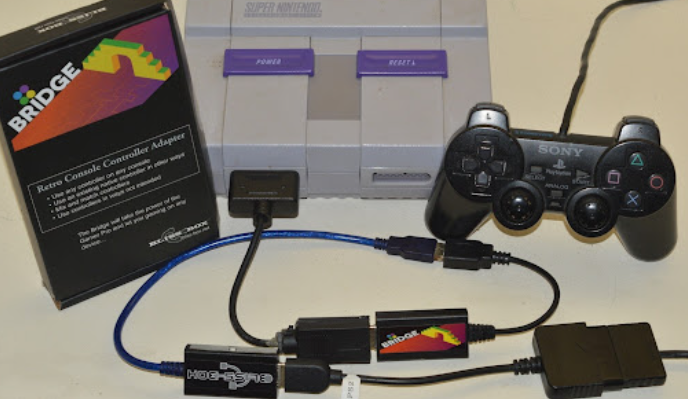
One of the most impressive aspects of the Bliss-Box ecosystem is the Bridge system.
Using four components
the adapter
an input cable
the Bridge
and an output cable
you can connect controllers to consoles they were never designed for.
Examples include:
- NES controller on PlayStation
- SNES controller on Sega systems
- Dreamcast controller on TG16
- N64 controller on GameCube
- Neo Geo controllers across multiple platforms
The combinations are massive. Bliss-Box documents dozens of supported cross-console mappings, and real-world use pushes even further.
The Blender: Experimental Input Made Practical
The Blender adapter allows two controllers to act as one, or one controller to act as two.
Inputs can be remapped, inverted, split, or merged. Outputs can go to USB or LLAPI. Four LLAPI streams can run simultaneously.
This enables setups like one-handed gaming, cooperative control schemes, mirrored inputs, and even playing two systems at once.
It’s inexpensive, powerful, and surprisingly fun.
AIR: Wireless Freedom Without Compromise
The AIR adapter removes the cable without sacrificing compatibility. Controllers can be used wirelessly at long range while retaining the full Bliss-Box feature set.
Simple idea. Massive quality-of-life improvement.
APC Switch Box for Large Collections
If you own many controllers, the APC switch box simplifies everything. Sixteen inputs, one output, clean switching without rewiring your setup every time.
The Big Picture
Yes, you can spend serious money building a complete four-player Bliss-Box setup.
But once it’s built, it’s done.
No replacing adapters.
No reconfiguring software.
No buying new hardware when a new idea comes along.
It scales with your imagination.
Final Thoughts
This isn’t a flashy company. Support happens quietly through email and Discord. There’s no marketing machine behind it.
But the people behind Bliss-Box clearly care. Support feels personal. Questions get real answers. Problems get solved without scripts.
It feels less like dealing with a company and more like talking to someone who genuinely wants your setup to work.
Bliss-Box doesn’t chase attention. They build tools that quietly make retro gaming better.
And sometimes, that’s exactly what the scene needs.
Source: One Adapter to rule them all